The Library of PDF
Linux From Zero: A Beginner's Visual Guide
Linux From Zero: A Beginner's Visual Guide
Couldn't load pickup availability
Go from “what is Linux?” to running your own scripts in 7 days. Linux From Zero is a 34-page interactive PDF from Library of PDF: a clean, clickable, beginner-friendly visual guide covering Ubuntu, Linux Mint, Fedora, Pop!_OS and WSL on Windows.
Thinking about trying Linux but don’t know where to start? This guide walks you through it one small step at a time, with no jargon and no assumed knowledge.
Pick the right distro with a simple flowchart, try it safely in a virtual machine, a live USB or WSL on Windows, then install Ubuntu screen by screen. After that you get a tour of the desktop, an easy start in the terminal, and cheat sheets for the commands you’ll actually use. A fillable 7-day practice plan keeps you moving, and a fillable command log keeps your notes in one place.
Everything is up to date for Ubuntu 26.04 LTS, Linux Mint 22.3, Fedora 45 and Pop!_OS, and every link was checked before publishing. This is Edition 1 (November 2026), US Letter size.
What’s inside
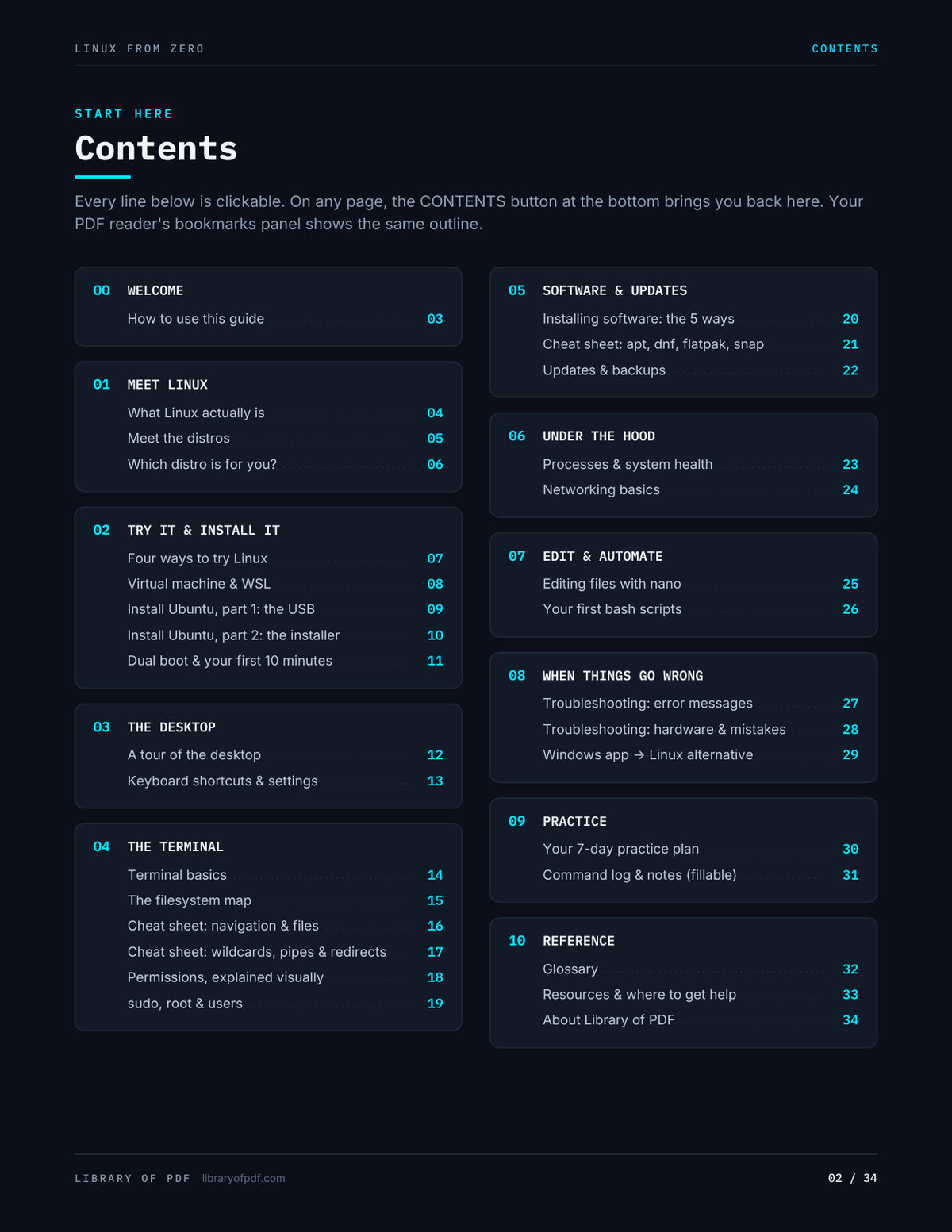
- Meet Linux: what a kernel, distro and desktop actually are, the big four distros compared, and a “which distro is for you?” flowchart
- Try it risk-free: live USB vs virtual machine vs WSL vs dual boot, side by side, with step-by-step VirtualBox and WSL setup
- Install Ubuntu step by step: making the USB (Rufus/balenaEtcher), boot-menu keys for every major brand, all 12 installer screens, dual-boot tips and your first 10 minutes
- Desktop tour: an annotated map of the GNOME desktop plus the shortcuts worth learning on day one
- The terminal: prompt anatomy explained visually, a filesystem map, and cheat sheets for navigation, files, wildcards, pipes and redirects
- Permissions made visual: rwx, owners and groups, the 755/644 number trick, sudo, root and managing users
- Software and updates: app stores, apt vs dnf vs Flatpak vs Snap side by side, release cycles, Timeshift and backups
- Under the hood: processes, system health, services, and networking basics with firewall commands
- Edit and automate: a nano survival guide and your first bash scripts, including a real backup script
- When things go wrong: common error messages decoded, hardware fixes, beginner mistakes, and commands you should never run
- Switching from Windows: 20 Windows apps and their Linux alternatives
- Practice and reference: a fillable 7-day plan (29 checkboxes), a fillable command log and notes page, a 33-term glossary, and a resources page with 34 free official docs, courses and communities
Interactive features
- Clickable table of contents, plus a Contents button on every page
- Full PDF bookmarks panel (45 entries)
- Cross-links between pages
- 54 live links to official docs, downloads and communities
- 70 fillable fields: checkboxes, system info, a command log and a free-notes box. Progress saves with the file.
Fillable fields work in Adobe Acrobat or Reader, Chrome or Edge, Firefox, macOS Preview, and most mobile PDF apps. This is a downloadable PDF. Nothing physical is shipped.
Who it is for
Complete beginners, Windows 10/11 users thinking about switching, students heading into IT, and anyone with an old laptop that deserves a second life.
Questions about the file or a future edition? Use the Contact page.
Share